

Table of Contents
- Why Sleep Headband Speakers Slip (And How to Stop It)
- Sleep Headband Sizing: Getting the Fit Right the First Time
- How to Adjust Sleep Headphone Speakers for Your Ear Position
- When Your Sleep Headband Is Too Loose: Quick Fixes
- When Your Sleep Headband Is Too Tight: Comfort Adjustments
- Side Sleeper Fit Testing: Keeping Speakers in Place All Night
- Care, Washing, and Speaker Removal Without Losing the Fit
- Conclusion: A Secure Fit Starts With the Right Headband
- Frequently Asked Questions
Last Updated: October 12, 2026
Why Sleep Headband Speakers Slip (And How to Stop It)
A sleep headband only works if the speakers stay put. When a sleep headband shifts during the night, the audio drifts from your ears and you wake up to fix it.
Sleep headband speakers stay in place when three things line up: the band is the right size for your head, each speaker sits directly over your ear canal, and the fabric holds enough tension to resist rolling and turning.
Below, we'll walk through sizing, speaker alignment, quick fixes for bands that are too loose or too tight, side-sleeper testing, and how to care for a headband without wrecking the fit. The National Sleep Foundation's guidance on sleep hygiene is a useful reminder that comfort and consistency matter as much as the audio itself.
Sleep Headband Sizing: Getting the Fit Right the First Time
Headband sizing is the foundation. Too big and it slides up over your eyes; too small and it squeezes your temples and still creeps. Aim for gentle, even tension all the way around.
Measuring Your Head Before You Buy
Wrap a soft tape measure around your head, just above your ears and across your forehead, keeping it level. Measure again over the widest point at the back of your skull, and use the larger number.
Most adjustable sleep headbands use stretch fabric with a rear slider or elastic loop, covering a range rather than one exact size.
| Fit Issue | What It Feels Like | What to Do |
|---|---|---|
| Too loose | Band rides up, speakers drift | Tighten rear adjuster; consider a smaller size |
| Too tight | Pressure at temples, headaches | Loosen adjuster; try a larger size |
| Right fit | Even, gentle pressure, no hotspots | Leave as is; check speaker alignment |
How to Adjust Sleep Headphone Speakers for Your Ear Position
Knowing how to adjust sleep headphone speakers is the step most people skip. Speakers sit inside small fabric pockets that slide forward, back, up, or down to line up with your ears.
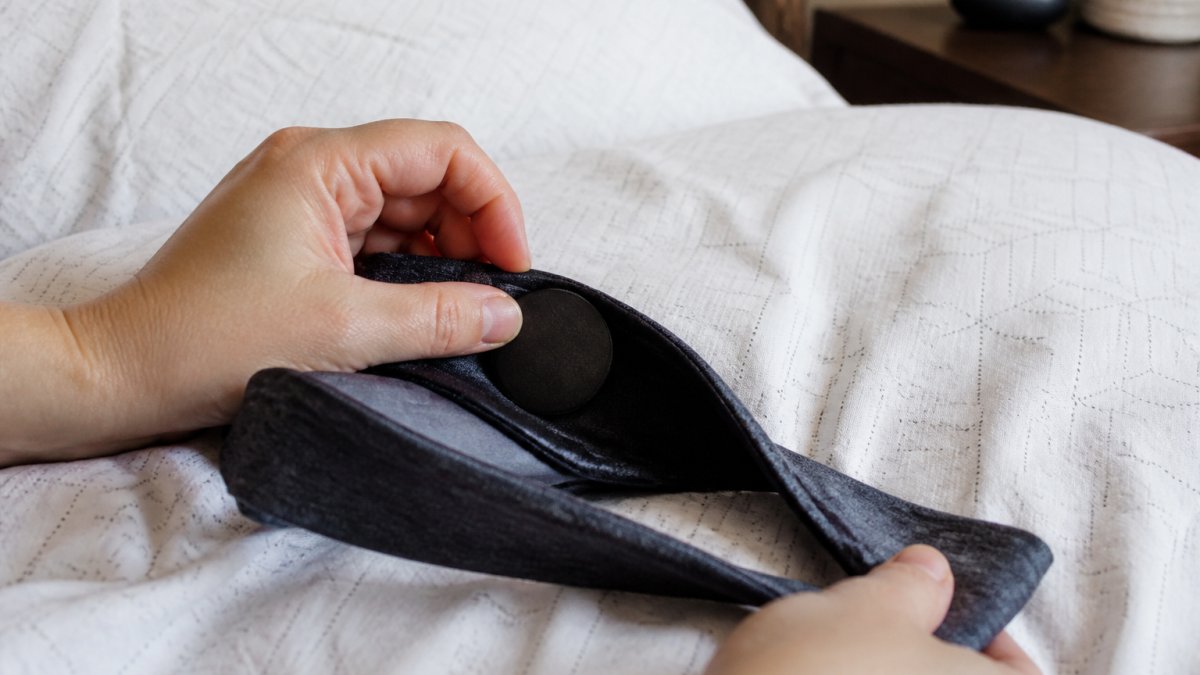
Put the band on and press a fingertip against each speaker through the fabric. Each speaker's centre should sit right over your ear canal opening, not on the cartilage above it.
Step-by-Step: Aligning Speakers With Your Ear Canal
- Put the headband on with the seam at the back and the label (if any) at the front.
- Press a finger against one speaker and slide the pocket until it sits over your ear canal.
- Repeat on the other side, checking both are level with each other.
- Play a test track and cup your hands over your ears; if the sound gets louder, the speakers are slightly off.
- Fine-tune by a few millimetres at a time, then lie down and re-check.
Expected result: With the speakers aligned, audio should feel centred and full, not faint or one-sided. If one ear sounds quieter, that speaker has shifted.
When Your Sleep Headband Is Too Loose: Quick Fixes
A sleep headband that's too loose is the number one cause of speakers that won't stay put. But "too loose" is three different failure modes, each needing a different fix. Diagnose which one you have before tightening anything. Consistent pressure across the temples often requires a similar level of precision as selecting eye masks that stay put to ensure your sleep environment remains undisturbed throughout the night.
Failure Mode 1: The Band Rides Up Over Your Eyes
This happens when the circumference is too large, so the band has nowhere to grip and migrates upward as you move. The telltale sign: waking up with the front edge pushed past your hairline.
Fix: Tighten the rear adjuster one notch at a time, then shake your head side to side. If it shifts more than a centimetre, tighten again.
Failure Mode 2: The Band Rotates Around Your Head
If you wake up with the speakers behind your ears or the seam shifted sideways, the band is rotating. That usually means too little friction against your hair or pillow, not that the band is too loose overall.
Fix: Check the band sits low enough, the bottom edge should rest at the base of your skull, not float above it.
Failure Mode 3: The Speakers Slide Within Their Pockets
Sometimes the band stays put but the speakers drift inside their pockets. That's a speaker-alignment problem, not band tension, and tightening won't help.
Fix: Slide the speakers back over your ear canals, then check for a closure mechanism, a Velcro tab, snap, or stitched channel. If the pockets are open-ended and the speakers slide freely, a small piece of double-sided fashion tape or a few stitches at the pocket opening adds just enough resistance without affecting comfort.
The Diagnostic Sequence
Before trying any fix, run this quick test:
- Put the band on as you normally would for bed.
- Lie on your back, roll to each side, then onto your stomach if you sleep that way.
- After each position, check whether the band and speakers are still in place.
- Note which failure mode you hit, riding up, rotating, or speakers sliding.
That tells you which fix to apply instead of guessing. Most people find one adjustment, tightening the rear slider a notch or switching pillowcases, solves it entirely.
If none of these fixes hold after two or three nights, the band is the wrong size or shape for your head. A band two sizes too big will never grip, and tightening one at its limit only creates pressure points that wake you up.
When Your Sleep Headband Is Too Tight: Comfort Adjustments
A sleep headband that's too tight is just as disruptive. Pressure at the temples or behind the ears causes headaches and marks, and can push the speakers out of alignment as the fabric stretches.
SleepBandZ Wireless Sleep Headphones →
Loosen the rear adjuster one notch at a time, re-checking speaker position after each change. With no adjuster, wear the band slightly higher on the forehead so less fabric sits over your ears.
Side Sleeper Fit Testing: Keeping Speakers in Place All Night
Side sleepers put the most pressure on a headband, with one side of the head pressed into the pillow for hours.
Before bed, lie on each side and press your ear into the pillow.
- Do a 20-minute lie-down test on each side before committing to a full night.
- Check the speaker position again after 10 minutes; if it has moved, re-align and re-test.
- Note any pressure points; a good band should feel barely there.
For side sleepers, the pillow matters too. A softer pillow lets the headband sink in rather than press the speaker against your ear.
Care, Washing, and Speaker Removal Without Losing the Fit
Most sleep headband guides stop at "hand wash and air dry." That's not enough, how you remove, wash, and reinstall the speakers directly affects whether they stay in place night after night.
How to Remove the Speakers Safely
Speaker removal methods vary by design, but they fall into three common types:
- Slide-out pockets: The speaker sits in a fabric sleeve with an open end. Gently pinch the speaker through the fabric and slide it toward the opening. Never pull on the wire, pull on the speaker housing itself.
- Velcro tabs: A small flap folds over the speaker and secures with Velcro. Peel the flap back slowly to avoid stretching the fabric, then lift the speaker out.
- Snap or button closures: Less common, but found on some premium bands. Unfasten the closure and ease the speaker out. These are the easiest to re-align because the closure marks the correct position.
If your band has none of these, the speakers are sealed inside, check the manufacturer's instructions before washing. Some sealed designs are spot-clean only.
Washing Without Destroying the Fit
Once the electronics are out, the fabric can be washed. But how you wash it matters more than most people realize.
- Hand wash in cool water with a mild detergent. Hot water relaxes stretch fibres, and once they relax, the band won't grip your head the same way.
- Never wring or twist the band to remove water. This distorts the shape of the speaker pockets, which is the most common reason speakers start sliding after a wash.
- Press the water out between two clean towels instead. Lay the band flat and roll the towels gently.
Reinstalling Speakers and Restoring the Fit
This step determines whether your speakers stay put, and almost everyone rushes it.
- Wait until the band is completely dry. Even slightly damp fabric stretches differently and won't hold the speakers in the right position.
- Slide the speakers back into their pockets, but don't push them all the way to the end. Leave a small gap so you have room to adjust.
- Put the band on and press a fingertip against each speaker through the fabric. Slide the pockets until the speaker centres sit directly over your ear canals.
- Play a test track and cup your hands over your ears. If the sound gets louder, the speakers are slightly off, adjust by a few millimetres at a time.
- Lie down and re-check on each side. The speakers should stay in place when your ear presses into the pillow.
How Often to Wash
A sleep headband sits against your skin and hair for hours nightly, collecting oils, sweat, and skincare products.
Between washes, wipe the speaker housings with a dry or very slightly damp cloth. Never use alcohol or solvents on the speakers, they can degrade the thin speaker membranes and affect sound quality.
A Note on Long-Term Fit
Even with perfect care, stretch fabrics relax over time.
This is where a well-made band earns its keep. SleepBandZ Wireless Sleep Headphones use ultra-thin, soft speakers set into a cozy headband, and the design is built for side sleepers who want the speakers to stay virtually undetectable while lying down. Bluetooth connectivity and USB charging keep the setup simple, so the only thing you adjust at night is your pillow.

Conclusion: A Secure Fit Starts With the Right Headband
Getting sleep headband speakers to stay in place comes down to three habits: measure your head, align each speaker over your ear canal, and adjust tension until it's snug but comfortable.
If you've tried other providers and still find yourself adjusting speakers at 3 a.m., the band itself may be the problem. Get started with SleepBandZ and enjoy deeper, more comfortable sleep.
Frequently Asked Questions
How do I keep sleep headband speakers from moving out of place?
Start by measuring your head circumference and choosing the correct size. Once you have the right fit, slide the speakers inside their pockets until they sit directly over your ear canals. Pull the headband down so it sits low on your forehead and covers the top of your ears. If the band still shifts, tighten the rear strap or tuck the excess fabric. A properly sized sleep headband with adjustable speaker pockets keeps everything aligned through the night.
Why do the speakers in my sleep headband shift during the night?
Speakers shift for three main reasons: the headband is too loose, the speaker pockets are not positioned correctly, or you move your head against the pillow during sleep. Side sleepers put direct pressure on one side of the band, which pushes fabric and speakers out of alignment. Choosing a headband with snug but breathable fabric and repositioning the speakers before bed reduces movement. If your headband is too loose, sizing down or adjusting the strap solves most of the problem.
How should sleep headband speakers line up with my ears?
The speaker center should sit directly over your ear canal opening, not above or behind it. Put the headband on, then press each speaker gently through the fabric until you feel it centered on your ear. Most sleep headbands have speaker pockets that let you slide the disc forward, back, up, or down. Take thirty seconds to check alignment before lying down. If sound feels muffled on one side, that speaker has drifted and needs repositioning.
Are sleep headbands comfortable for side sleepers?
Yes, when the fit is right. Sleep headbands designed for side sleepers use ultra-thin, flat speakers that sit flush against the ear without creating pressure points. The fabric, often fleece or a soft knit, cushions the ear against the pillow. The main comfort risk is a band that is too tight, which causes headaches, or too loose, which lets speakers slide. Testing your fit before bedtime and adjusting speaker position ensures you can lie on your side without ear pain or shifting.